Paint by JSON
Personal product
Role: Design, product, engineering
Demo
A 5 minute 25 second walkthrough of the plugin, from an empty palette to real API data landing on a frame.
The problem
Designers don't use lorem ipsum because they think it's good. They use it because, until now, getting real data into a Figma frame was more painful than it was worth.
So mockups get filled with Product Title and $0.00 and a grey avatar circle. Everything fits, because fake data is polite: it's exactly as long as the box, never empty, never weird. Then the design meets a real API in production and the seams show: a name that's 40 characters long, a price that's null, a description that runs three lines past the card, a list that's empty on a brand-new account.
The instinct is to blame the mockup. I think that's the wrong diagnosis. Designers who work next to engineers already know real data beats placeholder data. They've seen the gap close in code review a hundred times. The enemy isn't the designer. It's the friction. The whole job of this product is to remove the friction, so that designing on real data is no harder than reaching for lorem ipsum, and so you only have to set it up once.
What it is
The mental model is four small concepts that compose. A Source is where the data comes from: an HTTP request, or a pasted Local JSON payload. A Mapping binds a path in the response (data.products[0].title) to a layer attribute. A Transform tweaks a value on its way in: truncate, format as currency, reformat a date. And a Palette is the whole recipe: a name, one Source, and a list of Mappings. Save it once; apply it forever.
The name is texture, not the argument. The paint lexicon (source, palette, swatch, fill, apply, canvas) maps cleanly onto the real model. Paint-by-numbers makes everything look the same; Paint by JSON makes it look real. (One hard rule I held to: ease means "the friction is gone", never "the thinking is gone". That distinction matters to a craft-proud audience.)
How it works
01. Configure a Source. Point the plugin at an API endpoint, setting the method, headers, and auth, or paste a cURL command and let it parse the whole request for you. No API of your own? Paste a JSON blob as a Local JSON source instead (free, for everyone).
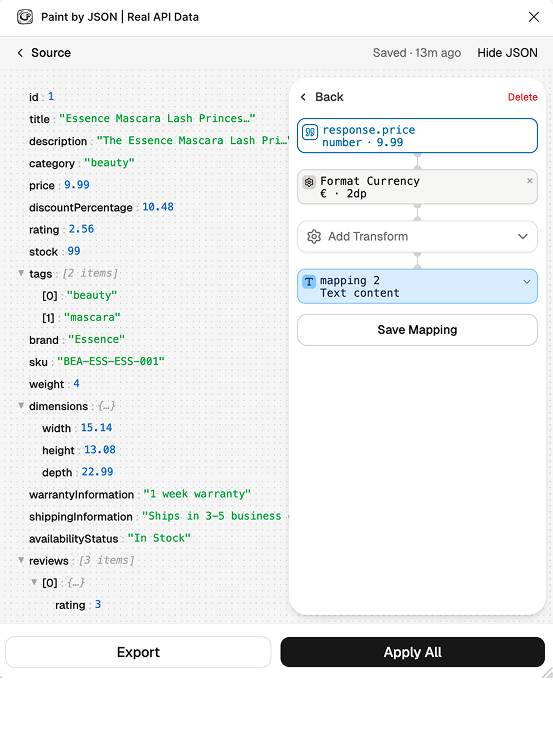
02. Map JSON to layers, visually. The response renders as an explorable tree. Pick a value, pick the layer it belongs to, and bind them. The plugin even suggests mappings by matching JSON keys to layer names. Each mapping targets a specific attribute: text, fill or stroke colour, opacity, visibility, an image fill, or a component property / variant.
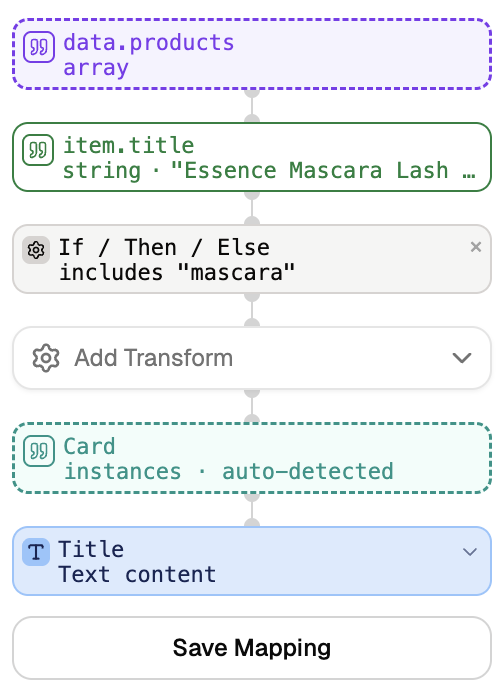
03. Add Transforms. Real data rarely arrives in display shape. Truncate a runaway title, format 12.5 as $12.50, turn an ISO timestamp into '12 May', branch on a value with a conditional. Transforms are embedded per-mapping, so the binding and its formatting travel together.
04. Save as a Palette, then apply. One click writes every mapping onto the frame. Re-run it any time the data changes, or apply the same palette to a different frame with the same layer names.
Collection mode
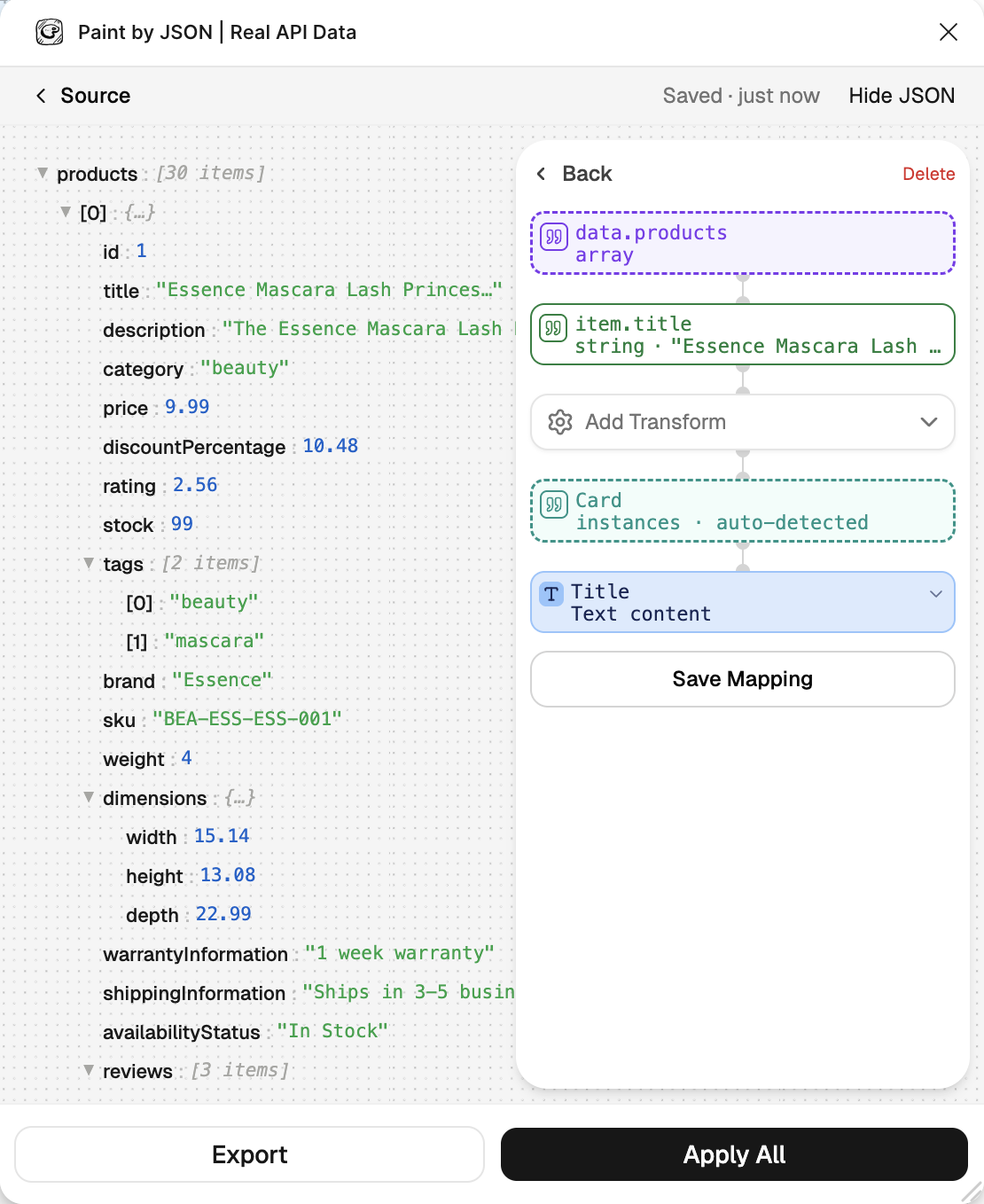
This is where it earns its keep. Mark a mapping with an array path (data.products) and the plugin walks the array, writing each item into a repeated component instance: a whole card grid populated from one endpoint.
It finds the repeated group by name first, then falls back to matching by dimensions, so it survives renames. It can also auto-create instances when the API returns more items than the canvas currently has. Single and collection mappings coexist in one palette: a hero title and a card grid, from the same response.
Developer handoff
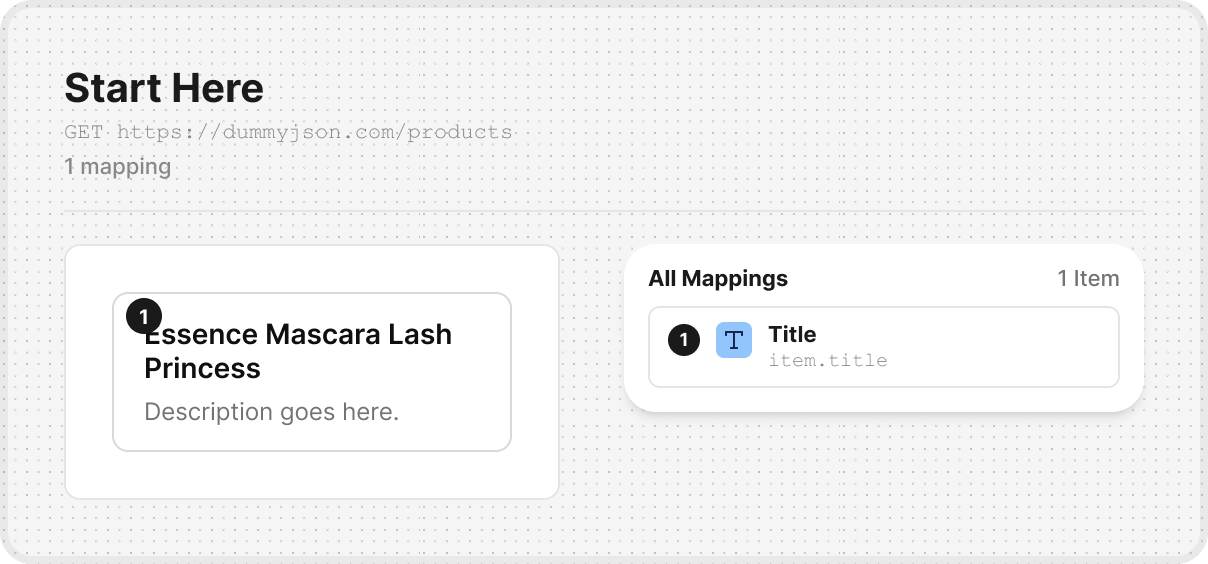
A palette is also a contract. Pro users can export one as JSON, as Markdown, or as Spec Frames drawn directly onto the canvas, so the engineer building the screen sees exactly which JSON path feeds which layer, with the transforms spelled out.
The mapping you did to make the mockup honest becomes the spec that keeps the build honest. Instead of reading a static mockup and guessing at the data model, a developer (or an AI coding tool) gets a machine-readable map of exactly what the design expects, and builds against the real shape rather than hallucinating a plausible one.
Design craft
The visual mapper is the product. The hard part was never writing values to nodes. It was making "bind this JSON to that layer" feel like direct manipulation rather than configuring a form. The response tree shows real values inline, with hover previews for hex colours and image URLs, so you can see what you're about to paint before you commit. Key-to-layer-name suggestions mean the common case is a click, not a typing exercise.
Honest, restrained UI. The interface is deliberately black-and-white. An earlier iteration carried decorative "cream" colour tokens that didn't reflect what was actually on screen; I stripped them out so the design tokens tell the truth. The plugin lives in a cramped Figma side-panel, so the visual language stays quiet and information-dense. The user's design is the thing that should have colour, not my chrome.
Cold-start matters more than any feature. A first-time user with no API of their own has to reach a successful "applied!" moment fast, or they leave. Sample-data onboarding seeds a working example so the very first thing a stranger sees is real data landing on a frame. The activation moment is the one I instrument and protect above all others.
Small moments. Drag-and-drop a palette file to import it. A small celebration on upgrade. {{TOKEN}} autocomplete for injecting secrets into URLs and headers without pasting raw keys into the UI. None of these are headline features, but I'd miss every one of them.
Key design & product decisions
Works without an account. The plugin is fully usable as a guest. Palettes save to Figma's local clientStorage. Signing in only adds cloud sync across files and devices. The bet: a designer should feel the value before they're asked for anything, including an email address.
Target layers by name, never by node ID. Node IDs are file-specific and break the moment a palette is applied to a different frame. Resolving by layer name is what makes a palette portable, the core promise of "save once, apply forever."
The proxy reversal: my favourite decision, because I changed my mind. The original case study proudly listed "no backend proxy" as a principle: the plugin fetched user APIs directly, keeping the architecture client-only. That held up until real usage hit the wall it was always going to hit. Many APIs block browser-origin requests with CORS, and a plugin's UI runs in a browser iframe. The purist answer ("just don't") wasn't good enough for a paying user staring at a TypeError.
So I reversed it, carefully. Direct fetch is still the default and the only path for guests. But when a call fails with a CORS-shaped error and the user is signed in, it silently retries through a server-side proxy on Vercel, hardened with a timeout, rate-limiting, a route guard, and SSRF defence so it can't be turned into a request cannon. The principle stands, with one defensible exception. Shipping taught me where the line actually was.
Tiered limits. Guest: 1 palette. Free (with an account): 2 palettes plus cloud sync. Pro: 50 palettes, every transform, and the export formats. The free tier is a real tool, not a crippled trial. The things behind the wall are what a daily, professional user needs, not what a curious one does.
Product & business
Who it's for. The first audience is the dev-adjacent product designer: someone who designs in Figma daily, reads REST responses without flinching, and works shoulder-to-shoulder with engineers. Not because others don't have the pain, but because this is the one audience the product fully serves today. Agencies need team palette-sharing (deliberately deferred), and front-end developers already have Storybook and the real app.
Positioning. Real data, as easy as lorem ipsum. I retired the old, vague tagline ("from spec to handoff", which told a stranger nothing) and rejected two tempting-but-wrong angles: "your mockups are lying to you" (blames an audience for something they already know) and "stop doing a robot's job" (scolds them for how they work today). The before/after demo survives, reframed as a capability flex, never a gotcha.
Money. Merchant-of-record billing through Paddle (so VAT/GST is handled globally), with a Pro tier at $12/month, or $9/month billed annually. Accounts run on Supabase with OAuth via Google, GitHub, and Figma. The plugin obtains a session through a pairing flow rather than asking anyone to type a password into a plugin panel. Break-even is roughly six Pro subscribers.
Analytics, with consent. Instrumentation is wired across the whole funnel, but it stays dark until the user explicitly grants consent, and that consent syncs both ways between local storage and their account.
Built with AI
I built most of this with Claude Code, and the lesson was about structure: AI moves at the speed of how legible your project is. What made it work was what AI doesn't give you for free: a written object model, a real architecture, clear data contracts, and a habit of decomposing work into pieces small enough to hold in one context.
When the structure was clear, AI sped everything up. When it was vague, AI faithfully amplified the vagueness. The tooling rewarded the same discipline good engineering always has.
What changed since the WIP version
This is the current case study. The parts that were promises back then are now the parts that ship, and the one principle I was proudest of ("no proxy") turned out to be the one shipping taught me to revise. What changed:
| Then | Now |
|---|---|
| "WIP", with an alpha demo. | Live on the Figma Community, with accounts, payments, and a paid Pro tier. |
| Tagline: "From spec to handoff". | Sharpened positioning: real data, as easy as lorem ipsum. The enemy is friction, not the designer. |
| A design decision I was proud of: "no backend proxy". | Reversed: an opt-in, SSRF-hardened CORS proxy for signed-in users. Direct fetch is still the default; Local JSON is free for everyone. |
| Roadmap item: "deeper data binding". | Shipped: collection mode (arrays → repeated components), auto-created instances, image fills, and variant / component-property targets. |
| Roadmap item: "smarter API configuration". | Shipped: paste a cURL command, inject secrets with {{TOKEN}} variables, or use a pasted Local JSON source. |
| Roadmap item: "handoff & sharing". | Handoff shipped: export a palette to JSON, Markdown, or on-canvas Spec Frames. (Team sharing remains deferred; it needs server-side credential scoping.) |